For middle school ensemble directors, managing a wide spectrum of student academic backgrounds is a daily balancing act. In a single class period, a director might teach a high-achieving student taking advanced high school mathematics alongside a developing player who struggles to read basic notation.
When Elaine Clayman stepped into her role as the solo orchestra director at Northwestern Middle School in Fulton County, Georgia, she was confronted with this exact demographic puzzle. Feeding into Milton High School in an affluent area north of Atlanta, her program of 130 string players represents a true academic “melting pot” that combines Gifted & Talented (GT) Academy students with developing players who need extra time to conquer fundamentals.
“In a traditional sectional or string classroom, you give a student one chance to play something,” Clayman explains. “They either did it or they didn’t do it. It’s very pass-fail, very black-and-white. My ultimate goal is that they learn the material, and it doesn’t matter to me how many times it takes them to learn it. I just want them to learn.”
To make that philosophy a reality, Clayman integrated MakeMusic to decentralize baseline note-checking, giving her students an interactive practice partner at home and transforming her live rehearsals into spaces of true musical artistry.
Replacing “Pass-Fail” with Unlimited Student-Centered Repetitions
The core strength of Clayman’s instructional model is that it accommodates every learning speed without creating extra grading work for her as a solo director.
When an assignment is posted, her advanced eighth graders can log in, inspect their parts, hear how their solo line fits into the full orchestra accompaniment, and finish the assignment in five minutes. Meanwhile, a developing student who needs extra support can practice the same passage 15 times at home. They receive immediate “red note/green note” visual feedback, can hover over specific notes to see their exact fingerings or pitch mistakes, and resubmit until they feel successful.
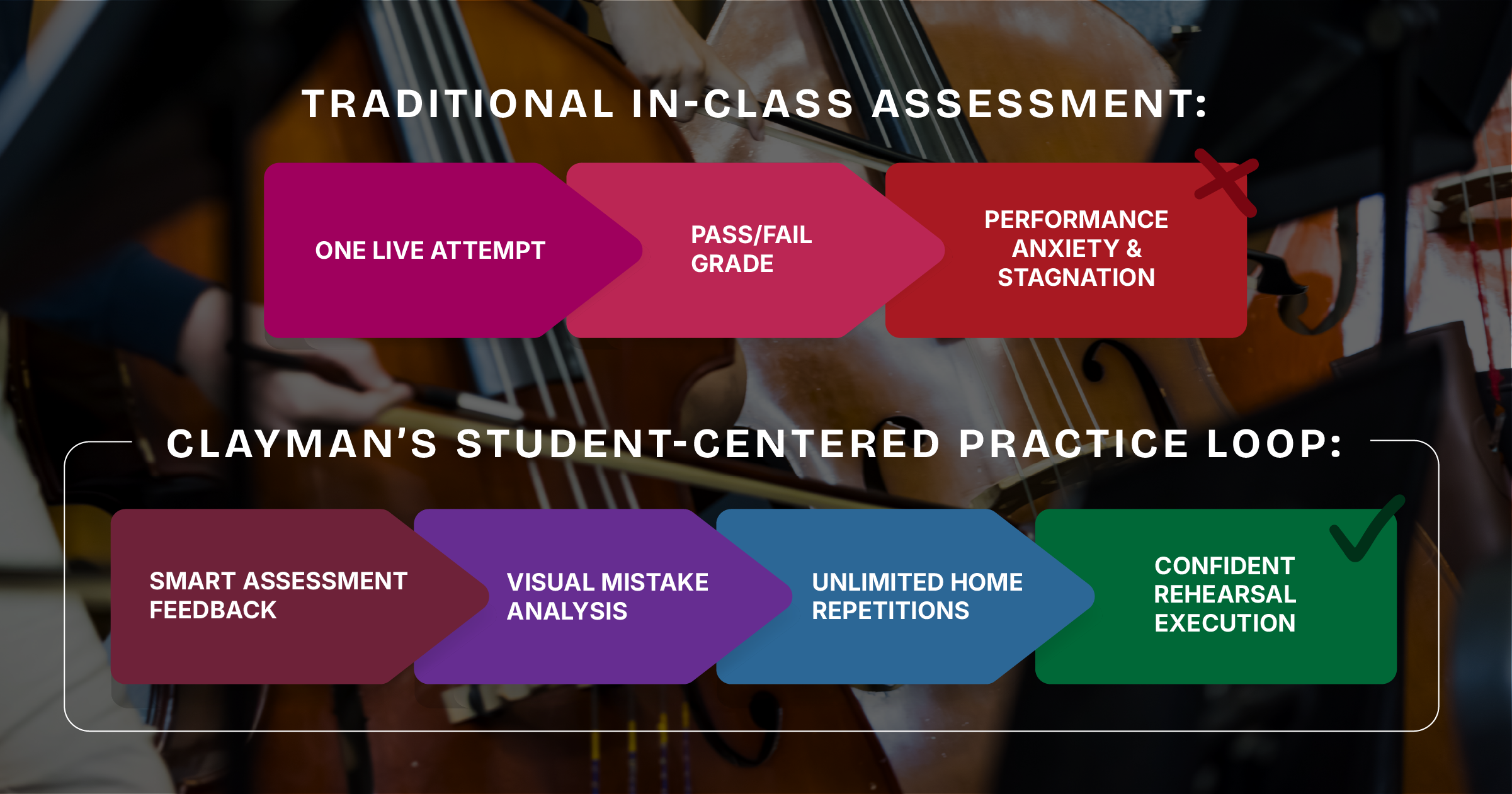
“The kids who do their playing tests at home in MakeMusic aren’t spending three minutes and turning it in,” Clayman notes. “They are spending 15 minutes getting it to 95% or 100%. They become much more aware of their own mistakes.”
The 9-Week Blueprint and Tuesday/Thursday Release Rhythm
To keep 130 middle school families organized across a busy school year, Clayman structures her digital assignments around 9-week term cycles to match the school calendar.
At the start of each term, students receive a clear roadmap of upcoming assignments. To prevent conflict with heavy academic test schedules on her campus, Elaine Clayman releases new assignments on Tuesdays or Thursdays and grants a full 7-day completion window.
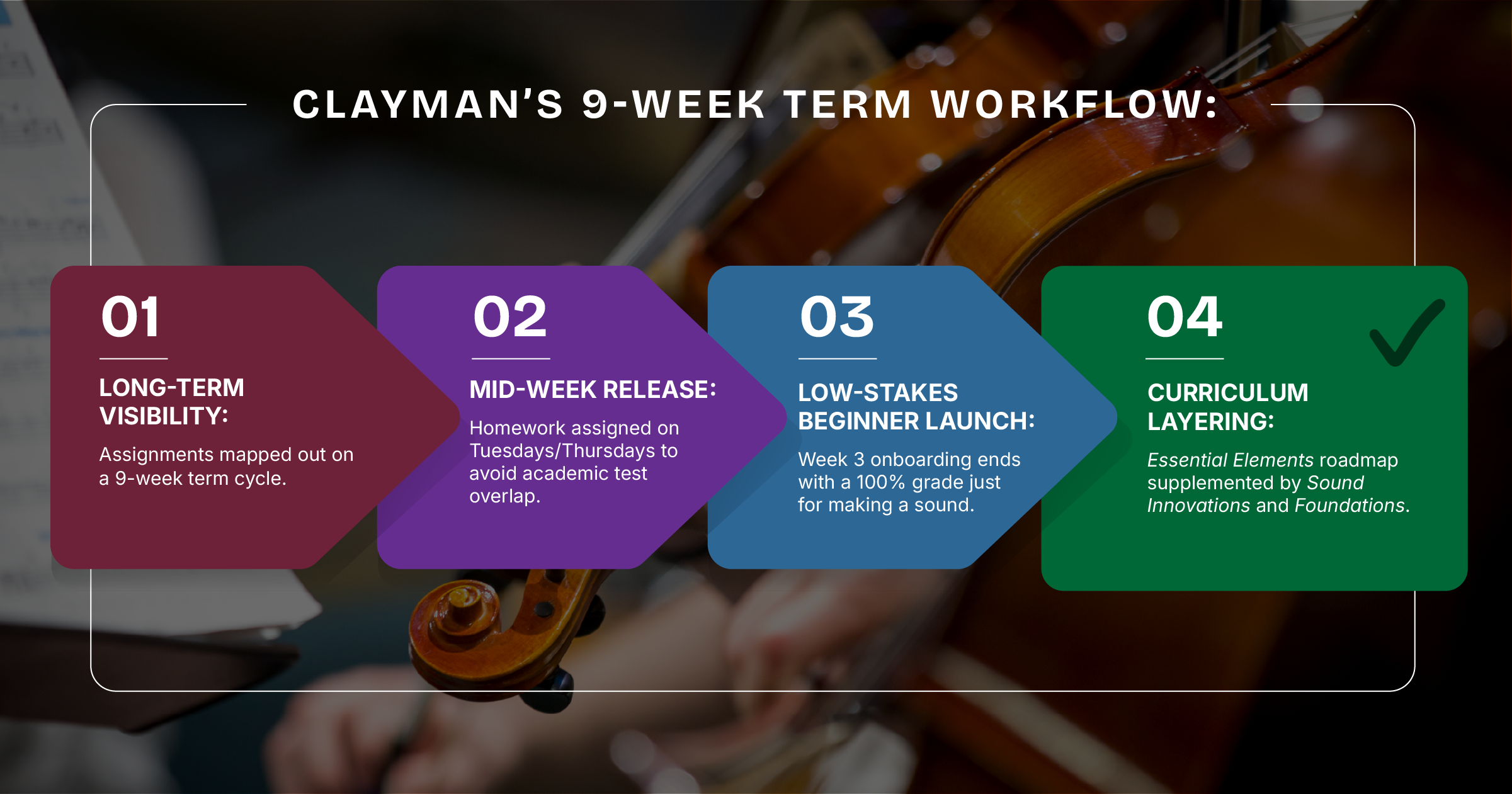
For her incoming sixth-grade beginners, Clayman waits until weeks 3 or 4 before introducing the software. Once students understand basic instrument carriage, she uses a pre-made email template via her grade book system (Infinite Campus) to send activation links directly to student email accounts.
The onboarding assignment is intentionally low-stakes: all a beginner has to do is hit record and produce a sound to earn a 100% grade. This simple routine eliminates technology fear and establishes a positive habit from month one.
Supplementing the Method: The Power of Print + Digital Integration
While Essential Elements serves as the core method roadmap for Northwestern Middle School, Clayman regularly layers in supplemental digital resources to address specific pedagogical needs.
“If I need my students to practice their first fingers more, my goal is to find every song out of every book that uses first finger,” says Clayman.
When Clayman introduced The Foundations Series in MakeMusic, her string students reacted with immediate enthusiasm. She printed physical score packets for class while utilizing the digital accompaniments to host festive “Christmas in the Orchestra Room” themed practice days off-season. By combining method books like Sound Innovations with interactive digital accompaniments, fundamental skill drills became engaging classroom events.
Effort-Driven Grading: How to Win Over Anxious Performers
Middle school orchestra students often struggle with performance anxiety when playing individually in front of their peers. Clayman addresses this by offering a clear choice paired with an effort-driven grading policy:
- Option A (Digital Home Submission): Students record in the privacy of their home as many times as they want, submitting only their highest score.
- Option B (In-Class Live Performance): Students who dislike using technology can play live for Clayman in class.
However, students quickly learn that the software is a much more forgiving evaluator than their director.
“They start learning that I am a much harsher grader than MakeMusic is,” Clayman laughs. “In MakeMusic, they will most likely get a 90 to 100. If they play live for me in class, they have to do a perfect take to get a high A. It’s a great incentive for nervous players to use the software at home.”
Under Clayman’s grading philosophy, any student who attempts an assignment receives at least a 70%. If a student submits a low digital score or encounters a device CPU issue, she reassigns the passage rather than recording a failing grade.
The Director’s Takeaway: Get One Account and Start Small
For educators hesitant to introduce new technology into an already packed teaching schedule, Clayman offers a simple, low-friction starting point:
“If you’re on the fence, at least just get one account for yourself as a teacher. You don’t have to dive into having every single kid do it right away. But if you have one account and turn the background accompaniment tracks on through your classroom speakers, you’re going to see how much more engaged your kids are in daily class. It makes your job so much easier.”
Reclaim Your Rehearsal Artistry
Ready to stop chasing wrong notes and start making music? Discover how simple it is to assign interactive method books and supplementary fundamental exercises in your classroom.
Start a free trial today and experience what you’ve been missing!